Where the page is
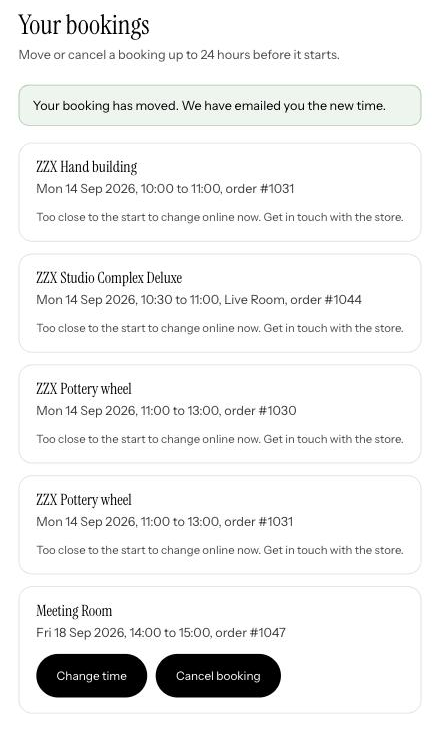
It lives on your store at /apps/booking/account, inside your theme so it looks like the rest of the site. Link to it from your customer account page or your navigation, and the confirmation email can point there too. A customer who is not signed in is asked to sign in first.
What a customer can do
- 1See their bookings
Upcoming ones first, with the time, the space and the order number, then the last ninety days and anything cancelled.
- 2Move one
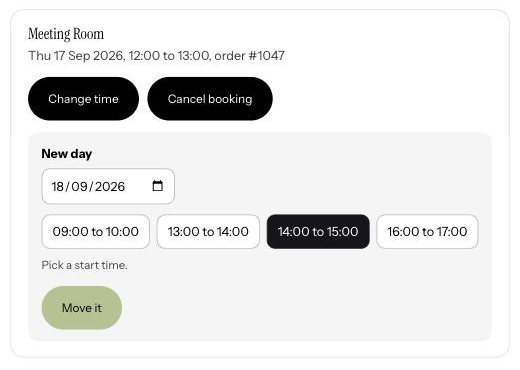
Pick a day, see the free times for a booking of the same length, choose one. The time they had goes back on sale; the price and the order do not change, so there is nothing to charge or refund. A booking paid with a pass stays paid with that pass: the use they spent moves with it, nothing is taken twice and nothing is asked for at checkout.
- 3Cancel one
Two taps, then it is done. The time is free again, the booking leaves your calendar and Google Calendar, and any pass that paid for it goes back to them.
The notice you set
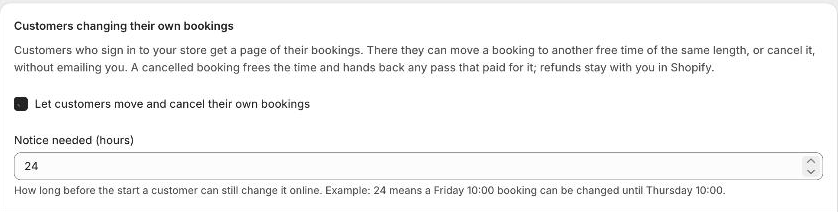
On Settings, under Customers changing their own bookings, switch it on and set the notice in hours. 24 means a Friday 10:00 booking can be moved or cancelled until Thursday 10:00; after that the page says to get in touch. Set 0 to allow changes right up to the start, or switch it off to handle every change yourself.
What it never does
It never moves money. A cancelled booking is still a paid order in Shopify until you refund it, which is where the store's own cancellation policy comes in. It never touches bookings you added by hand, bookings still waiting on payment, or bookings you are checking for a clash; those say to get in touch. And it never lets one customer see another's bookings: the page matches on the email the order was placed with, and only for the signed-in customer.
What you see
A moved booking sits at its new time on your calendar, in the same colour, with the same order. A cancelled one leaves the calendar. Both customer emails go out as usual if you have confirmation emails on: one for the new time, one for the cancellation.
Good to know
Can they change to a different length or product?
No. A move keeps the length and the product, so the price stays what they paid. For anything else they cancel and book again, or you change it from the calendar.
Do they need a customer account?
Yes. The page is for signed-in customers, which is also what makes passes work. Guests who booked without an account can still email you.
Which plan?
Every plan.