How a hold works
- 1Held straight away
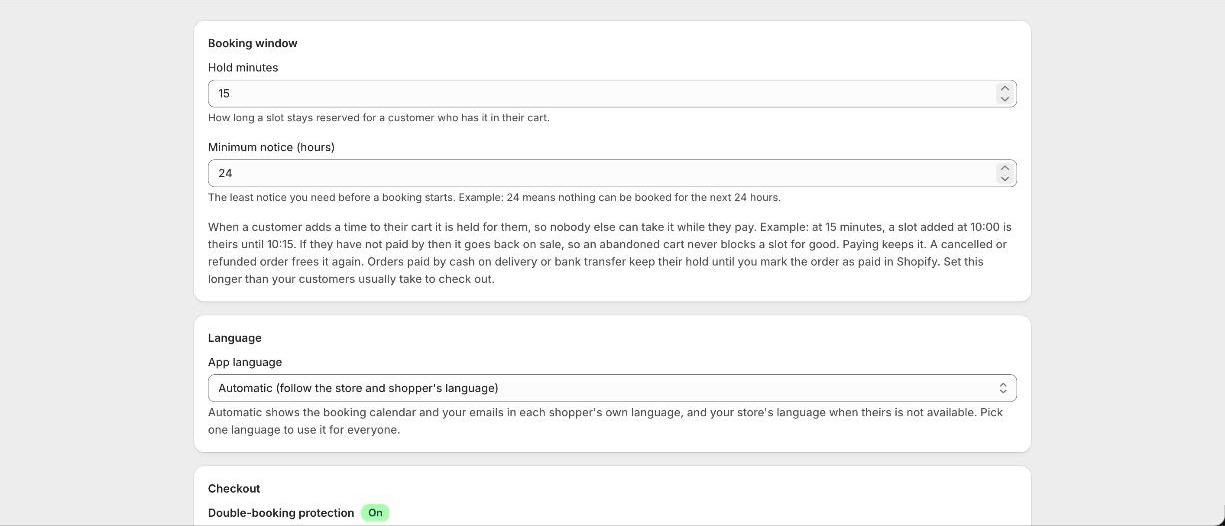
The moment a customer puts a time in their cart, it is taken off everyone else for a window you choose.
- 2Kept by the cart guard
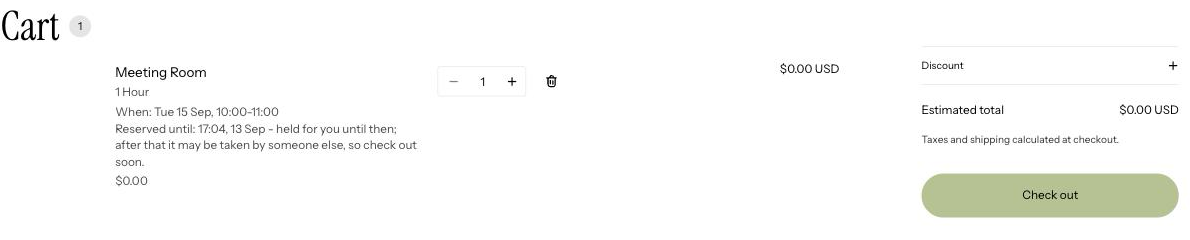
The cart guard runs on your cart page and keeps that hold alive while they check out. This is why you turn it on.
- 3Checked again at checkout
The time is validated once more before payment, so a slot taken in the meantime cannot be paid for.
- 4Released if they never pay
If the order is not paid inside the window, the time goes back on sale. An abandoned cart never blocks your diary.
- 5Cash and bank transfer are different
An order placed with cash on delivery or a bank transfer holds its time from the moment the order is created and keeps holding it until you mark it paid or cancel it. It does not lapse, because the customer has already ordered.
Turning it on
Double-booking protection is a single switch under Settings and covers your whole store. Turn it on once. Normal checkout and discount codes carry on as usual.
If two ever slip through
In the rare case two paid orders land on the same time, Booker marks the second as a clash on your calendar, emails you about it, and keeps that time blocked so nothing else lands on it while you sort it out.
What the customer sees
On Shopify Plus they get a branded message explaining the time has gone. On every other plan checkout is blocked the same way, with the standard Shopify message instead. The protection itself works on all plans; only the branded wording needs Plus.
Good to know
Do I need the cart guard as well?
Yes. Without it a held time can be lost between the cart and checkout.
What if someone abandons their cart?
The hold lapses after your window and the time goes back on sale.
Can two people end up booking the same room at once?
No. The time is held while the first customer pays and blocked once they have paid, and the check runs at the checkout itself, not only on the calendar. If two people try for the same slot, the second is stopped before they can pay.
What happens if someone is sitting on the checkout page with my last slot?
It is held for them for the number of minutes you set, then it goes back on sale if they have not paid.