Your calendar
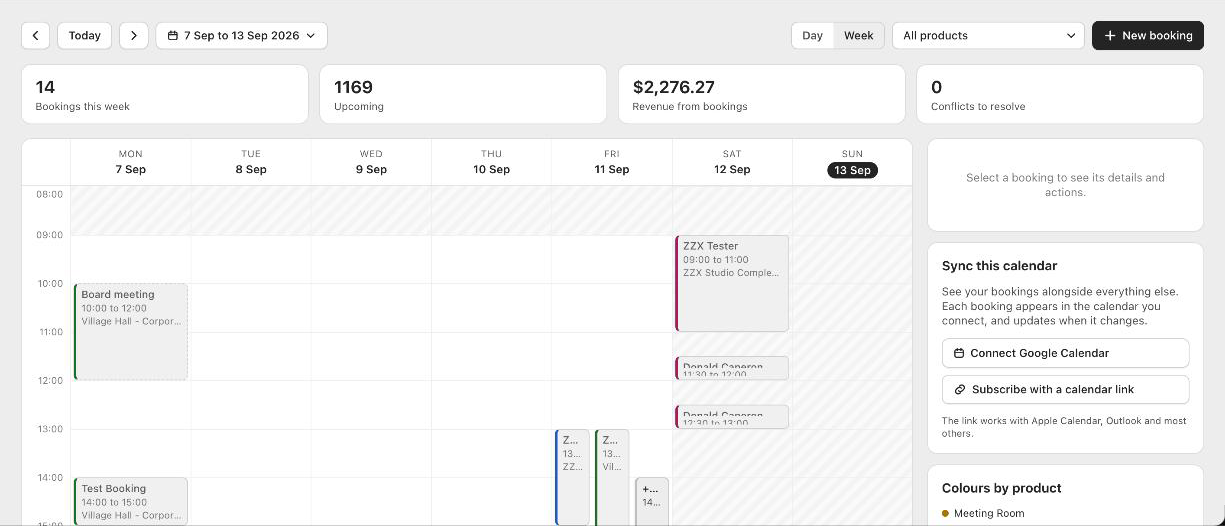
Booker opens on your calendar. Switch between a week and a single day, jump to any month, and filter to one product. Each product has its own colour so you can read the week at a glance. Along the top you get bookings this week, what is coming up, and the revenue behind them.
Looking at one booking
Click any booking to see the customer, the time, the space and the total in a panel beside the calendar, with a link straight to the Shopify order. Bookings still waiting on payment are shown differently from paid ones, and anything clashing is marked in red.
Walk-in and phone bookings
Someone rings up and books the studio for Friday. Add it yourself from New booking. It blocks that time exactly like an online booking, so nobody can take it from under you.
Cancelling
Cancel or refund the order in Shopify and Booker cancels the booking, puts the time back on sale, and removes it from your Google Calendar if you sync. You can also cancel a booking you added by hand from the calendar itself, and Booker emails the customer to tell them.
Good to know
Can I add a booking without an online payment?
Yes. Add it from New booking and it blocks the time like any other.
How do I free up a time?
Refund or cancel the order in Shopify. Booker frees the time on its own.