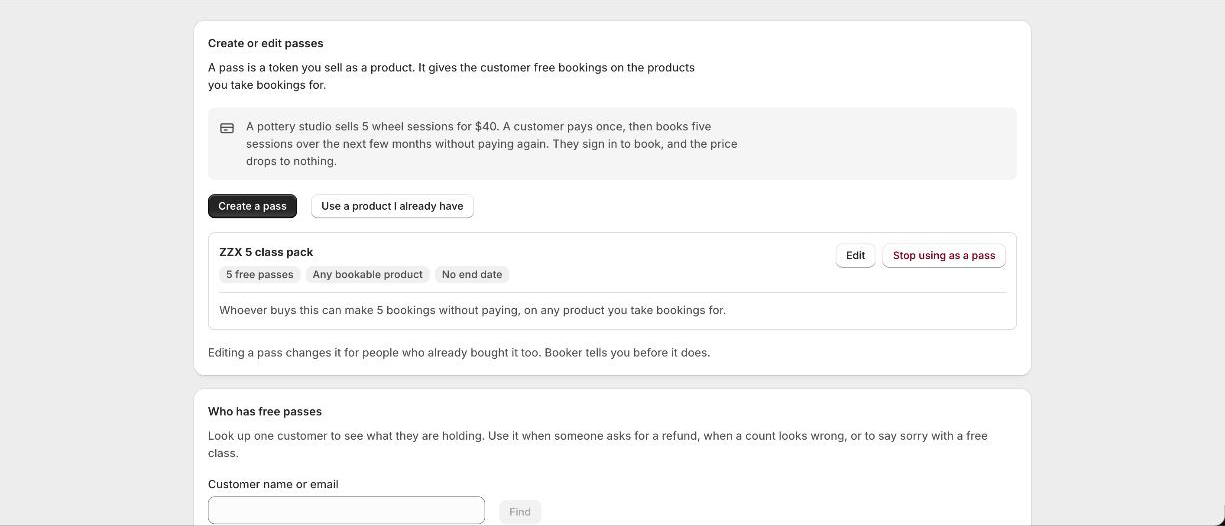
Create a pass
- 1Open Passes
It sits under Products in the app. Press Create a pass, or Use a product I already have if you sell one already.
- 2Say what it is worth
How many free bookings one pass gives. A five class pack is worth 5.
- 3Say what it covers
Any bookable product, or only the ones you name. A yoga pass can be for yoga only while a general pass works on everything.
- 4Set a deadline if it is a membership
A pass can run out after a number of days. A monthly membership sets 30, so this month's classes do not pile up on top of the months a member never came.
What the customer sees
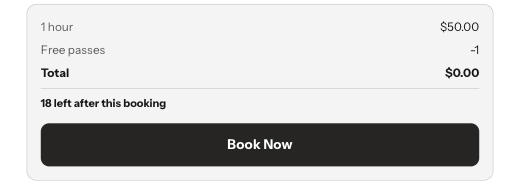
The pass is a product like any other, so they buy it at your checkout. Booker adds a line to its product page and to the cart saying what it gives them, for example five free bookings on Pottery wheel and Hand building. From then on, when they are signed in and book something the pass covers, the class shows its normal price with a line beneath it saying a pass is paying, and the total drops to nothing. Paid extras are never covered; a pass pays for the booking itself.
One pass per place
A class booked for three people uses three passes, because a five class pack means five people through the door. A two hour room hire uses one pass, however long it is. Booking several rooms at once uses one pass per room. A customer who is one pass short pays for the whole booking rather than getting part of it free.
Memberships that renew
Booker does not bill anyone on a schedule itself. To sell a monthly membership, sell the pass through a subscription app that raises a real order each month. Every renewal order tops the customer up again, with its own deadline, exactly as if they had bought the pass by hand.
Looking after a customer
The Passes page has a lookup. Type a name or email and you see what that customer holds, batch by batch, with the deadline on each. Take one back, or give one as an apology, from the same place. Editing a pass changes it for everyone who already bought it, and Booker tells you so before it does.
Refunds and cancellations
Refund a pass order in Shopify and the passes come off the customer's account. Cancel or refund a booking a pass paid for and the pass goes back to them, into the same batch it came from with the same deadline. If they had already used some of what they bought, only what is left comes back; nobody loses a class they have already been to.
Good to know
Which plan?
Creating and handing out passes needs Pro. Spending them, stopping a pass and looking a customer up work on every plan, so a downgrade never eats classes a customer has paid for.
Do customers have to sign in?
Yes. Passes live on the customer account, so a guest checkout cannot spend them. The product page tells a signed-out customer that a pass would cover this and asks them to sign in.
Can two people share a pass?
A pass belongs to the account that bought it. Two people booking under the same account can spend it.