Take a deposit
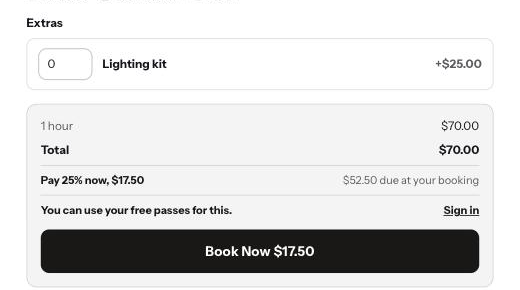
Open the product and turn on Take a deposit, then set a percentage. Say a room is 95 and you charge 25%: the customer pays 23.75 now. The order in Shopify shows the full 95 with 71.25 still to pay, so your books are right and nothing looks like a cheap booking. The amount owed is also on the confirmation and reminder emails and on your calendar. If you sell in several currencies, the deposit converts at checkout on its own. The deposit is a share of the booking itself; any paid extras are paid in full at checkout.
Collect the rest
- 1Email a payment link
Open the booking on your calendar and press Email a payment link. The customer gets a link from your store and pays the rest online, whenever suits them.
- 2Or take it on the day
Cash, card machine, bank transfer, however you normally take money. Then press They have paid me on the booking, and Shopify marks the order paid.
- 3Or use Shopify
The order itself has a Collect payment button, the same one you would use for any order that is part paid. Anything you do there shows up on your calendar too.
Offer paid extras
- 1Add an extra
On the product, turn on Paid extras and add a name and a price, for example a lighting kit for 25 or cleaning for 40. Set how many of it one customer can add; 1 makes it a simple yes or no. Booker keeps a hidden product called "Your product - extras" with one option per extra; that is what goes into the cart, as its own line next to the booking, so the price is right in every currency. Leave that product alone. It is unlisted, so it never shows in your collections or search. Customers cannot buy from it on its own: anyone who opens it is sent to the booking product, and an extra in the cart with no booking behind it is removed.
- 2The customer ticks it
They choose their extras when they book, and the running total updates.
- 3Charged with the booking
Prices come from your settings, never the browser, and everything is charged in the same Shopify order.
Good to know
Which plan has deposits and paid extras?
Both are on Pro, and both work on any Shopify plan. On Shopify Plus the booking line is priced at the deposit; on other plans the rest comes off as a line discount at checkout. The customer pays the same either way.
How do I collect the rest of the money?
Email the customer a payment link from the booking on your calendar, or take it in person and press They have paid me. The order in Shopify shows what is still owed either way. Booker never charges a customer automatically.
Why does the order total not match what was charged?
It is meant to. A deposit order shows the full booking price, the part that was paid, and the rest as still to pay. Shopify calls that Partially paid.